Calendar-first PTO management for modern teams

Time off, managed effortlessly.

Request, approve, and track paid time off — all in one beautiful dashboard. Built for multi-location teams with automatic balances, recurring schedules, Google sign-in, and calendar sync.

Request in secondsPick dates on the calendar and submit without digging through forms.
Approve with one clickManagers instantly review pending requests and keep teams moving.
Track balances automaticallyProration, carryover, overdraft, and adjustments handled for you.
March 2026
Month ViewFilter: All Locations
PTOSickWFHCustom
Mon
Tue
Wed
Thu
Fri
Sat
Sun
1
WFH · Ava
2
3
PTO · Omar
4
5
Training
6
7
8
9
Sick · Lina
10
11
WFH · Ben
12
13
PTO · Maya
14
15
Client Site
16
17
WFH · Team
18
19
Sick · Alex
20
21
22
23
PTO · You
24
25
Holiday
26
27
28
Trusted by HR Teams
Multi-Location Ready
Google OAuth
ICS Calendar Sync
Automatic Balance Math

Everything your team needs to handle time off without the spreadsheet chaos.

Designed around the way people actually plan time away: on a calendar, with clear visibility, instant approvals, and balances that stay accurate automatically.

Interactive Calendar

Plan time off directly from the calendar.

Employees click a date range, submit a request, and instantly see how it fits into the team schedule. Managers can review availability without jumping between tools.

Day, week, and month views with color-coded time-off types.
Drag-and-drop for rescheduling pending requests.
Filter by user or location, with shareable calendar URLs.

Calendar Overview

Smart Allocation Engine

Balance calculations that take care of the messy parts.

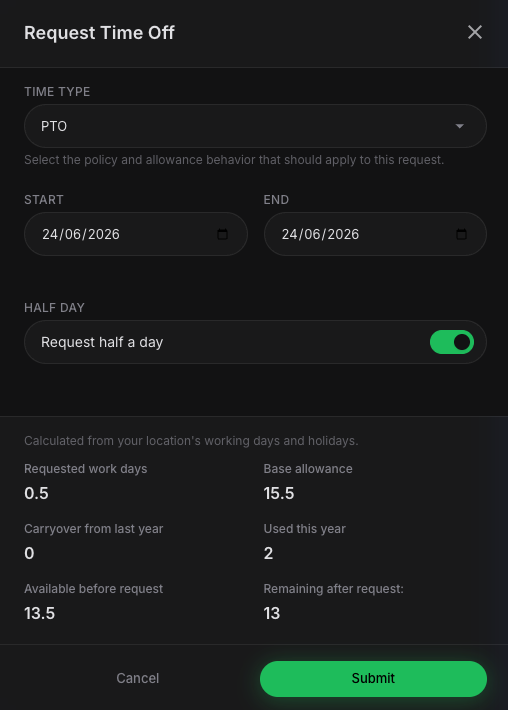
Set annual allowances once and let the system handle proration, carryover caps, overdraft limits, manual adjustments, and clean audit history.

Automatic proration based on employee start date.
Carryover and overdraft rules per policy.
Base + Carryover + Adjustments − Used = Remaining.

Allocation Snapshot

Base20
Carryover3
Remaining11
PTO11 / 23 days
Sick7 / 10 days
WFHFlexible
Approval Workflow

Keep approvals fast, visible, and easy to manage.

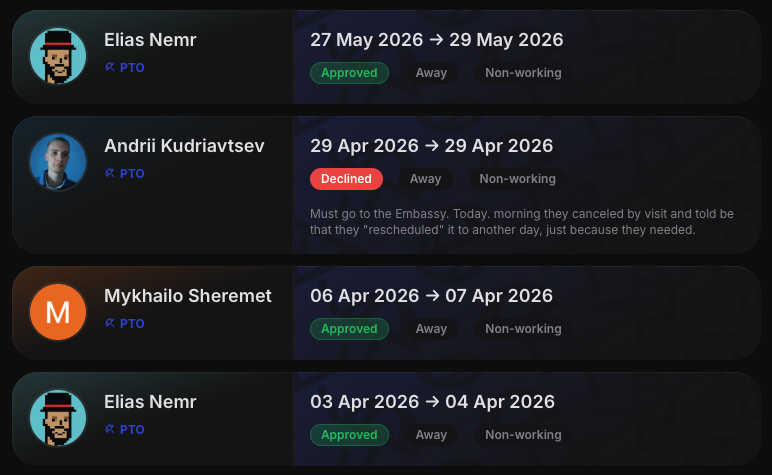
Managers get a clear request queue with statuses, badges, and one-click actions. Already-approved requests can also move through a withdrawal flow without losing history.

PENDING → APPROVED / DECLINED lifecycle.
Withdrawal requests for approved plans with tracked state changes.
Auto-approval for policies that do not need manager sign-off.

Request Queue

Anna PetrovaMar 18–20PendingApprove / Decline
Jay MorganMar 22ApprovedApproved by Alex
Lina CostaMar 12DeclinedOverlap conflict
Ben MurrayMar 28WithdrawnUpdated plan
Recurring Time Off

Handle repeat schedules without repetitive admin.

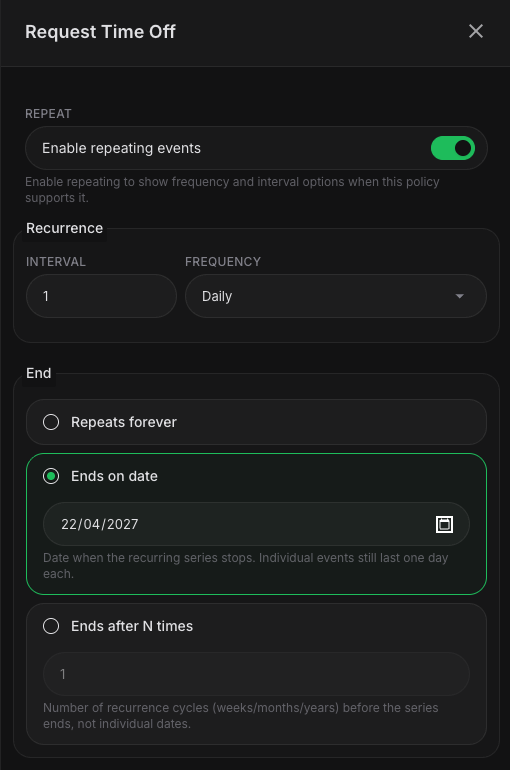
Perfect for recurring WFH days, monthly appointments, and part-time schedules. Update a single occurrence or roll changes across all future events.

Weekly, monthly calendar-day, and monthly business-day repeat modes.
Edit scope: this occurrence, all, or this and future.
Exception overrides for individual dates.

Recurring Rule

RepeatEvery Tuesday
Edit ScopeThis & future
Multi-Location & Timezone Support

One system for distributed teams across offices and regions.

Configure locations with their own timezone, working days, week start, and country-specific public holidays. Team calendars stay local without becoming fragmented.

IANA timezone support and configurable working weeks.
Holiday overlays calculated by country.
Flexible calendar views by user, team, or location.

Location Settings

London Office
Europe/London · Week starts Monday
MTWTFSS
Dubai Team
Asia/Dubai · Holiday overlay enabled
SMTWTFS
Flexible Time Policies

Create the exact leave structure your organization needs.

Build unlimited time-off types, connect them to locations, and define allocation rules per policy. Archive or restore policies without losing historical data.

Custom types like PTO, Sick, WFH, Bereavement, and more.
Each type supports color, icon, location type, and working/non-working flags.
Policies tie types, locations, and balance rules together cleanly.

Time Types

PTO
Away · Working day impact
Sick
Away · Non-working eligible
WFH
Remote · Working day
Bereavement
Away · Policy based
Employee Dashboard

Give every employee a clear picture of what they can use.

Allocation cards, progress bars, and recent requests make it easy to understand balances at a glance. No need to ask HR how many days are left.

Remaining, used, and pending balances per policy.
Clean progress visualization with icons and color cues.
Recent request history in one place.

Your Dashboard

PTO11 remaining
Sick7 remaining
WFHAlways available
User Management

Manage large teams without losing visibility.

Search, filter, and browse employees with list or grid views, soft-delete users safely, and inspect per-user allocation history whenever you need answers.

Role, location, and status filters with scalable browsing.
Per-user event log and allocation history.
Manual balance adjustments with notes and auditability.

Team Directory

Alex KimOrg AdminLondonActive
Maya ReedUserNYCActive
J. MorganLocation AdminDubaiActive
ICS Calendar Sync

Bring approved time off into any calendar app.

Subscribe from Google Calendar, Outlook, or Apple Calendar using secure signed URLs. Team members stay informed without logging in every time.

Works with major calendar apps.
HMAC-signed URLs for secure access.
Own pending plans and approved events included.

Calendar Subscription

ICS FeedCopy secure link
Imported intoGoogle Calendar
Instant Onboarding

Get a team up and running in minutes.

Google OAuth removes password friction. The first user creates the organization, default policies are provisioned automatically, and email domains can auto-join the right team.

One-click Google sign-in.
Auto-detected timezone, working days, and holiday country.
Default PTO, Sick, and WFH policies created for you.

Setup Flow

1. Sign inGoogle OAuth30 secDone
2. Create orgName + location1 minDone
3. Invite teamAuto-join domains2 minReady

Clear permissions for every role.

Everyone sees exactly what they need: employees can request and view availability, admins control policies and approvals, and owners keep full organizational control.

RoleRequests & BalanceApprovals & PoliciesOrganization Control
UserRequest time off, see own balance, view team OOONo policy editingNo org settings access
Location AdminEverything a user can doApprove or decline requests for their location, manage local policiesNo global org control
Org AdminEverything aboveManage all locations, users, policies, and typesBroad operational control
Org OwnerEverything aboveFull management accessOrg settings, domains, and complete control

Built for trust, isolation, and secure access.

Security is not a separate add-on. It is part of the product foundation, from sign-in to permissions to tenant separation.

Google OAuth

No password database to manage. Sign in securely with Google and keep onboarding friction low.

HTTP-only sessions

Session handling designed to reduce exposure in the browser and keep authentication flows cleaner.

Role-based isolation

Users only see what they should, including out-of-office visibility without exposing unnecessary detail.

Multi-tenant separation

Organizations stay separated so data remains scoped correctly across teams and locations.

React 19TypeScriptGraphQLPostgreSQLKeystoneJSPrismaTailwindCSS

Simple pricing placeholder, ready for your final tiers.

You can keep this section as a teaser for launch, swap in per-seat plans later, or hide it until pricing is finalized.

Starter

Free / small teams

Good for trying the product and launching basic PTO workflows.

Core calendar requests
Google OAuth onboarding
Basic approvals

Growth

$ to be defined

For teams needing policies, multiple locations, recurring requests, and deeper controls.

Smart allocations
Multi-location support
ICS sync

Enterprise

Custom / org

For organizations that want central control, richer governance, and rollout flexibility.

Advanced admin control
Full role model
Multi-tenant readiness
Ready to simplify PTO?

Replace forms, spreadsheets, and guesswork with one clean system.

For employees, managers, and admins alike — a faster way to request time off, stay aligned, and keep balances accurate automatically.